Bulk IP purity workflow
Batch IP and Proxy Checker
Check multiple IPs, domains, URLs, or proxy hosts before account login, proxy purchase, server review, or campaign setup. The batch tool uses the same ping123 IP intelligence report as the single-IP checker.
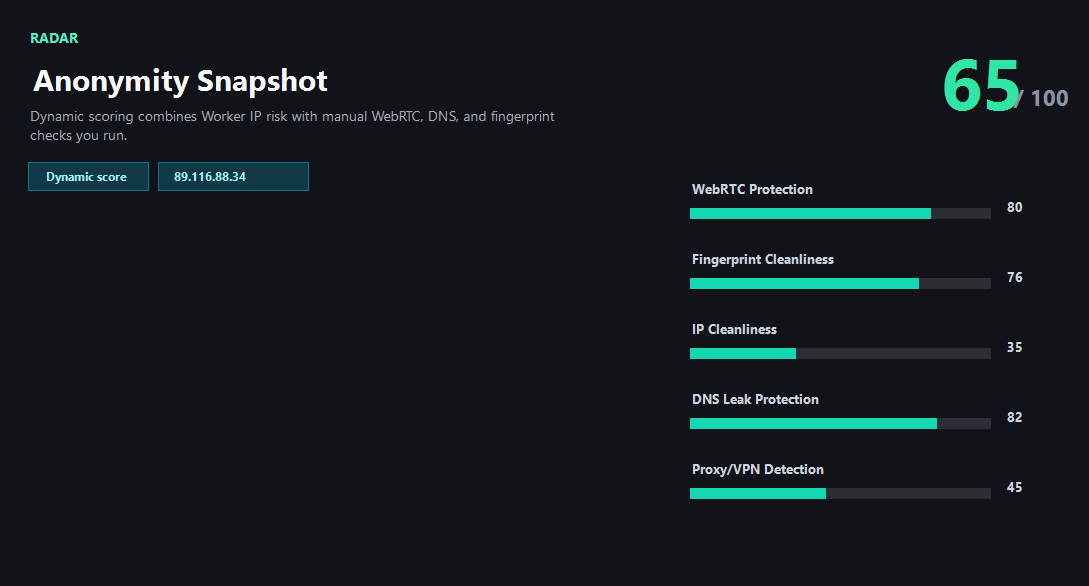
Example ping123 result screenshot
The screenshot below uses the designated sample IP 89.116.88.34, not a current visitor IP. Use it as a visual reference for the fields explained on this page.
When batch checking matters
Proxy buyers, VPS users, traffic teams, and account operators often need to compare many exits before using them. A single IP check is useful, but a batch view makes provider quality, datacenter concentration, and repeated high-risk signals much easier to spot.
The first version keeps the workflow simple: paste targets, resolve hostnames, score each IP, then export the result. It does not require a paid provider to work, but optional enrichment can improve classification accuracy later.
What the result fields mean
Normal signals vs. risk signals
Usually normal
- Most rows have high purity and low risk.
- Network type matches the intended use case.
- Sharing heat stays low across the provider sample.
- No repeated abuse, Tor, or datacenter signals appear in account-sensitive rows.
Needs attention
- Many rows resolve to the same ASN or datacenter provider.
- Several targets show high sharing heat or abuse reports.
- Domains resolve to unexpected countries or organizations.
- Rows marked replace should not be used for important account work.
Next action
Use batch results before buying or rotating proxies
A CSV of several exits is more useful than trusting one sample IP. Compare type, risk, sharing heat, and verdict before touching important accounts.
Fixes and next steps
- Remove rows marked replace before account login.
- Separate datacenter IPs from residential or mobile exits.
- Retest provider samples after rotation or region change.
- Export CSV before discussing quality with a vendor.
FAQ
How many targets can I check at once?
The first version allows up to 50 targets per request.
Can I paste domains?
Yes. ping123 resolves A or AAAA records and scores the first available IP.
Does CSV export include all evidence?
CSV includes the operational fields; open a single IP report for full evidence.
Before you continue
Open the full report for risky rows
Batch checking is for triage. Use the full IP Risk page when a row needs evidence, platform-fit guidance, or repair steps.