Proxy quality check
Proxy checker
A proxy check verifies whether the visible IP, ASN, network type, location, headers, DNS behavior, WebRTC candidates, and reputation match the proxy identity you intended to use.
Contact channel is not open yet.
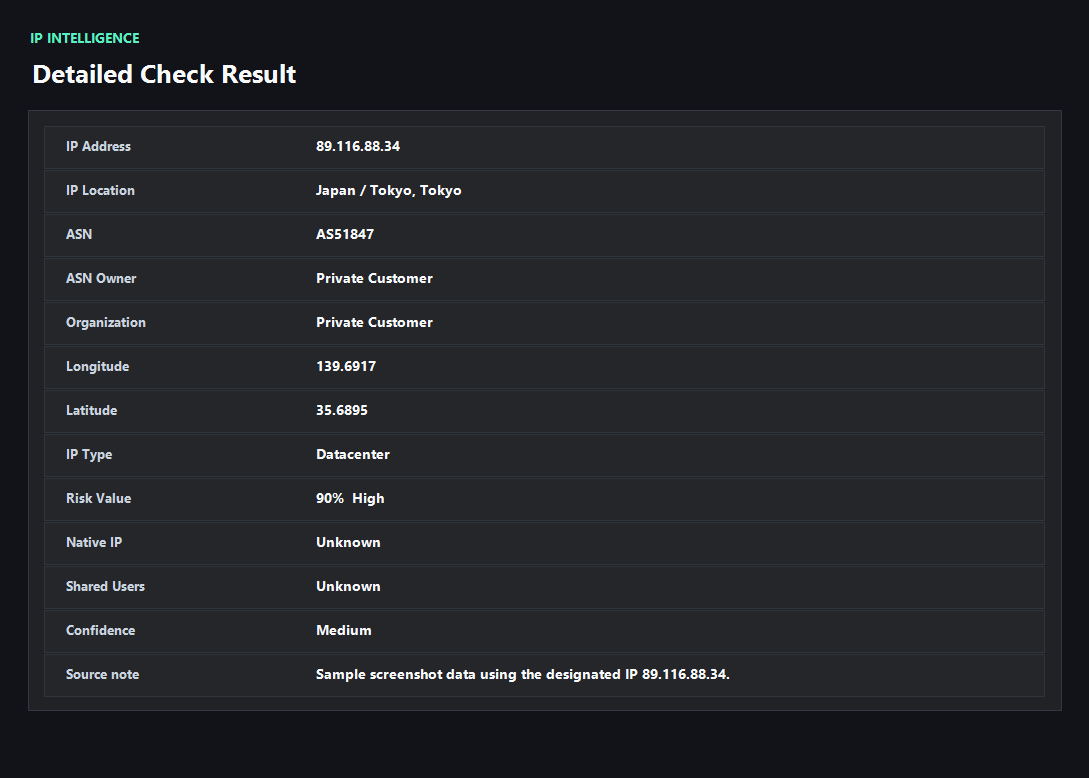
Example ping123 result screenshot
The screenshot below uses the designated sample IP 89.116.88.34, not a current visitor IP. Use it as a visual reference for the fields explained on this page.
What proxy users should verify first
A proxy can be active and still be risky. The public IP may change, but the ASN might belong to a hosting provider, DNS may still use the original network, WebRTC may expose a direct candidate, or the browser fingerprint may not match the proxy region. A useful proxy check reads all of these together.
Residential, mobile, ISP, and datacenter proxies behave differently. Residential or mobile exits often look closer to normal consumer traffic, but they can still be shared, abused, or mismatched. Datacenter proxies are faster and cheaper, but many login and anti-fraud systems classify them more aggressively.
Proxy type, ASN, and reputation
ASN is one of the fastest clues. A proxy from a large cloud or hosting ASN may be fine for scraping public pages but poor for account login. An ISP or mobile ASN may look more natural, but history matters. If an IP has abuse, spam, or signup fraud reports, the network type alone will not save it.
Location is another common failure. If the proxy seller claims a United States residential IP but the result shows a different country, a datacenter organization, or a timezone conflict, do not use that session for sensitive activity until you retest or switch exits.
Headers and browser consistency
Some proxies add headers, use inconsistent geolocation, or work only for certain traffic types. Browser-based checks cannot inspect every upstream header a website may see, but they can reveal visible IP, DNS, WebRTC, timezone, language, and fingerprint clues from the actual browsing session.
For account workflows, test the exact browser profile and proxy configuration you plan to use. Do not test in one browser and log in with another. Profiles, extensions, WebRTC rules, and DNS settings can change the result.
How ping123 reviews Proxy checker results
This page is maintained as an editorial companion to the live ping123 tool. It explains which signals are collected, what a normal result usually looks like, and which mismatches deserve a second check before a login, payment, account review, or VPN/proxy workflow.
The sample screenshot is a fixed reference image, not a current visitor result. Use it to understand field names and result layout, then run the live check in your own browser session because IP, DNS, WebRTC, timezone, and reputation signals can change after every network switch.
- Start with the visible public IP and ASN.
- Compare country, timezone, DNS, and WebRTC signals instead of trusting one score.
- Treat risk labels as troubleshooting evidence, not as a guarantee of anonymity or safety.
- Rerun the check after changing VPN, proxy, browser profile, DNS, or network.
What the result fields mean
Normal signals vs. risk signals
Usually normal
- Visible IP matches the proxy provider, city, and country you selected.
- ASN and organization match the claimed proxy type.
- DNS and WebRTC do not expose the original network.
- Browser timezone and language match the proxy region for account work.
Needs attention
- Datacenter ASN appears when you expected residential or mobile proxy quality.
- IP reputation is high risk, shared, abused, or spam-associated.
- WebRTC or DNS bypasses the proxy.
- Location, timezone, and account region conflict before login.
Next action
Check proxy quality before using it for accounts
Continue with the live ping123 check before trusting this browser session.
Contact channel is not open yet.
Fixes and next steps
- Switch proxy exits when ASN or country does not match the provider claim.
- Use a residential or mobile proxy only when the workflow truly needs that network type.
- Disable browser WebRTC exposure or route it through a safer profile.
- Set DNS and browser timezone to match the intended region.
- Check IP reputation before signup, login, or payment.
- Avoid reusing one shared proxy across unrelated accounts.
- Record the IP, ASN, country, DNS result, WebRTC result, browser timezone, and final decision when the check is part of an account or team workflow.
- Change only one setting at a time, then rerun the same ping123 page so the cause of a warning is easier to identify.
FAQ
How do I know if my proxy is working?
The public IP should change to the proxy exit and the supporting DNS, WebRTC, and browser signals should not point to the original network.
What is a residential proxy?
It is an IP associated with a consumer ISP or home-style network. It may look natural, but reputation and sharing still matter.
Are datacenter proxies bad?
Not always. They are useful for many technical tasks, but account and payment systems often treat them as higher risk.
Can WebRTC bypass a proxy?
Yes. Browser peer-connection discovery can expose a different route unless the browser, VPN, or profile restricts it.
Should I check reputation before using a proxy?
Yes. A proxy can be technically active but still risky because of abuse history or shared usage.
How does ping123 keep this page useful for review and real users?
We keep the page tied to a working tool, show example result screenshots, explain limits, and avoid saying that one score proves identity, anonymity, or account safety.
Does advertising affect this result?
Commercial relationships have not been confirmed. Promotional offers are not presented here.
Before you continue
Run the check before you continue
Use the live ping123 result as the source of truth for this browser session, then compare DNS, WebRTC, timezone, and IP reputation before deciding what to do next.
Contact channel is not open yet.