Reputation and trust signals
IP reputation checker
IP reputation checks help security teams, site owners, proxy buyers, and account operators understand whether an IP address may be distrusted because of abuse reports, spam history, hosting infrastructure, proxy labels, or inconsistent browser signals.
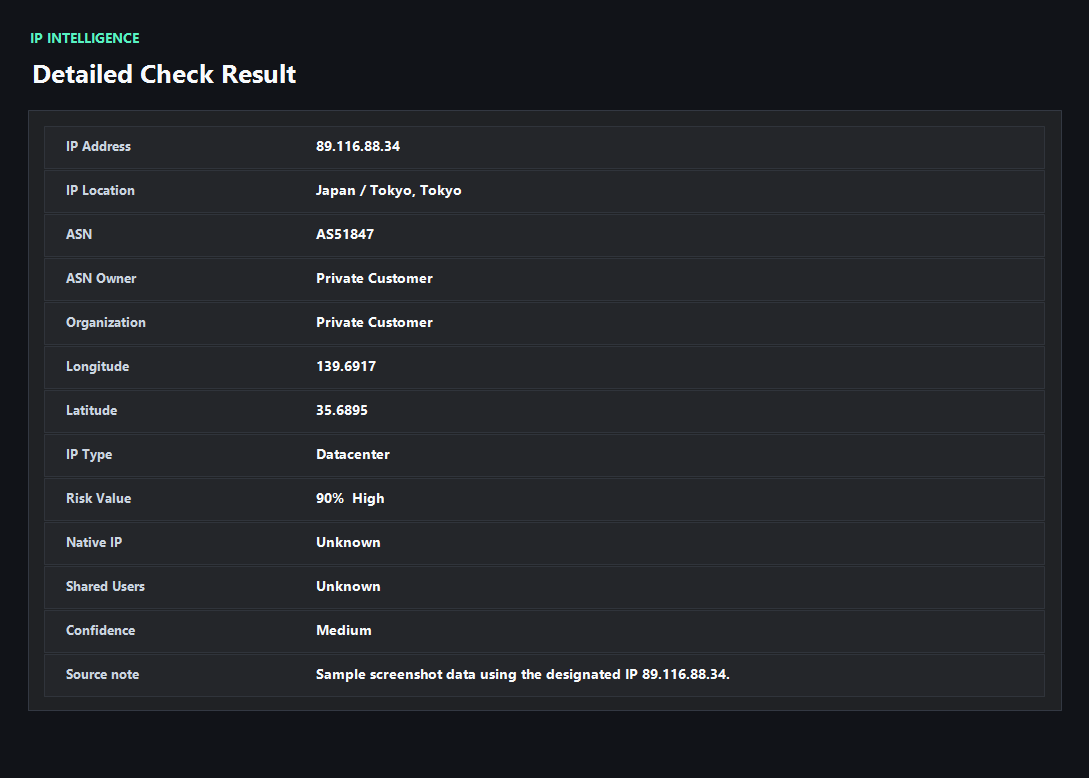
Example ping123 result screenshot
The screenshot below uses the designated sample IP 89.116.88.34, not a current visitor IP. Use it as a visual reference for the fields explained on this page.
Reputation is a history and context problem
An IP address can earn a poor reputation because previous users sent spam, attacked services, ran credential stuffing, hosted malware, or shared the address across too many suspicious sessions. Hosting and proxy ASNs can also be treated with more caution in consumer workflows.
A good reputation check therefore looks beyond country and city. It asks whether this IP has abuse context, whether the network type fits the use case, and whether the browser leaks contradictory signals.
Blacklist results need interpretation
A single blacklist hit may matter a lot for email, less for web browsing, and differently for login risk. Total reports, recent activity, category, and network ownership all change the meaning.
ping123 frames reputation as a decision aid. If the problem is historical abuse, changing IPs may be correct. If the problem is DNS or WebRTC mismatch, the IP itself may not be the root cause.
Use reputation checks before trust-sensitive actions
Check IP reputation before sending mail, opening admin panels from a new network, creating accounts, buying proxies, or troubleshooting login blocks. It is much easier to catch a risky IP before it touches an important workflow.
For teams, keep a simple log of IP, ASN, risk score, blacklist context, and time of test so future incidents can be tied back to network changes.
What the result fields mean
Normal signals vs. risk signals
Usually normal
- No meaningful abuse or blacklist context for the current use case.
- The ASN and usage type match what you expected.
- DNS and WebRTC checks do not expose another network.
- The IP has stable geography and does not rotate unexpectedly.
Needs attention
- Recent abuse reports, spam signals, Tor flags, or blacklist context.
- The IP belongs to a hosting or proxy network but is used for consumer account flows.
- A clean-looking public IP conflicts with DNS, WebRTC, timezone, or language.
- Multiple accounts or systems suddenly report blocks after the same IP change.
Next action
Separate reputation problems from leak problems
If the IP has bad history, rotate or remediate it. If the browser leaks contradictory signals, fix DNS, WebRTC, or fingerprint consistency first.
Fixes and next steps
- Rotate away from IPs with strong recent abuse or blacklist evidence.
- Contact the provider when a purchased static IP has incorrect or polluted reputation.
- Use a different network type when the workflow rejects datacenter or proxy ASNs.
- Fix DNS/WebRTC leakage and retest before blaming the IP itself.
- Avoid sharing one IP across unrelated accounts or automation workflows.
- Keep reputation checks in your pre-login, pre-send, or proxy QA checklist.
FAQ
What is IP reputation?
It is a trust signal based on how an IP has been used and classified by security, anti-abuse, network, and blacklist systems.
How is IP reputation different from IP quality score?
Reputation focuses on trust and abuse history; quality score combines reputation with usability, proxy/VPN risk, leaks, and consistency.
Can I fix bad IP reputation?
Sometimes. You may need to rotate IPs, ask the provider to remediate abuse, delist from relevant services, or stop the activity causing reports.
Does a blacklist always mean the IP is unusable?
No. It depends on the list, category, age, and use case. Email and payment workflows are usually more sensitive than casual browsing.
Should I check reputation for residential proxies?
Yes. Residential does not automatically mean clean; shared abuse and fast rotation can still damage trust.
Before you continue
Check reputation before the IP touches important systems
A quick reputation check can prevent confusing login warnings, proxy QA failures, email issues, and account risk investigations.