Safe exposed-service scan
Online Port Scanner and Exposure Check
Check whether common ports are open before trusting a server, proxy, or account environment. The first version uses an allowlist of common ports and external probe nodes.
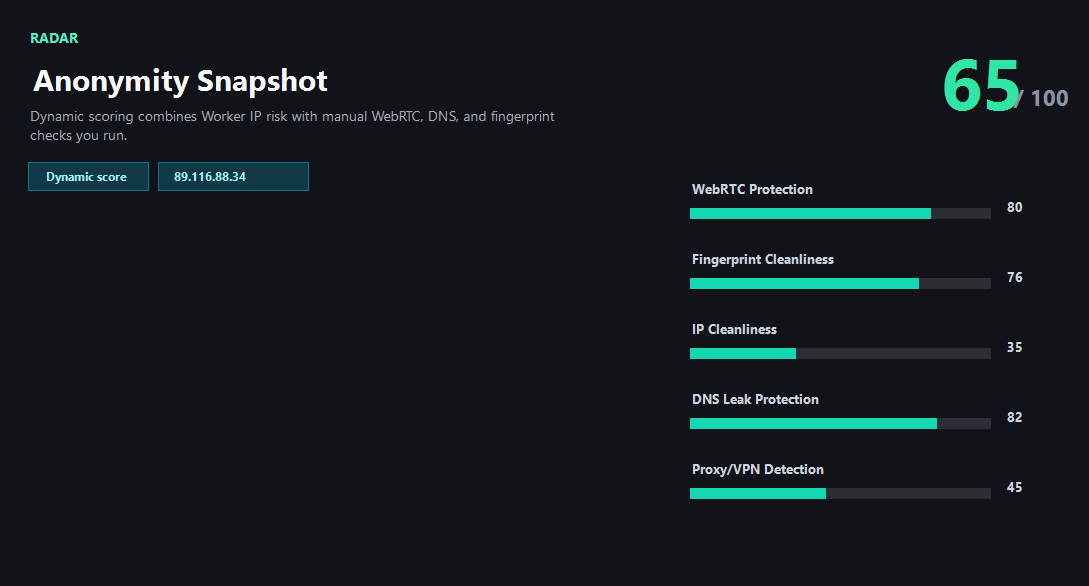
Example ping123 result screenshot
The screenshot below uses the designated sample IP 89.116.88.34, not a current visitor IP. Use it as a visual reference for the fields explained on this page.
What the scanner should and should not do
The scanner is intentionally limited to a common-port allowlist. It is meant for quick exposure checks, not broad vulnerability scanning.
External nodes perform the TCP checks. The Worker validates input, signs requests, and returns either scan results or a clear not-configured state.
What the result fields mean
Normal signals vs. risk signals
How the composite risk score is calculated
Multiply the AbuseIPDB abuse score by 0.72 and take the greater of that value and the network baseline: Tor 72, VPN/proxy 58, or datacenter 42. If several types match, use only the first in that order. Then add 1 point per report, capped at 18 points. Round and limit the result to 0–100. Browser observations and latency do not contribute.
0–29 is low, 30–59 medium, 60–79 high and 80–100 critical. The composite score represents signals under the current rules, not a probability of malicious activity.
Port exposure and route measurements are separate security and connectivity observations. They do not change the composite IP score and do not guarantee platform access.
Usually normal
- Only expected web ports are open.
- Proxy and RDP ports are closed unless intentionally exposed.
- All locations agree on the same exposed services.
- Unexpected ports are fixed before account or production use.
Needs attention
- 1080 or 3128 is open on an IP meant to look like a normal user exit.
- 3389 RDP is exposed to the public internet.
- SSH is open on a server that should not be administered publicly.
- External scan nodes are not configured yet.
Next action
Review unexpected port exposure separately
Port exposure and route measurements are separate security and connectivity observations. They do not change the composite IP score and do not guarantee platform access.
Fixes and next steps
- Close public admin ports that are not required.
- Restrict SSH or RDP by firewall, VPN, or allowlist.
- Port exposure and route measurements are separate security and connectivity observations. They do not change the composite IP score and do not guarantee platform access.
- Retest after firewall or provider changes.
FAQ
Why only allowlisted ports?
The tool is for safe exposure checks, not broad scanning.
Can Worker scan ports directly?
The production design uses external probe nodes for TCP checks.
What does unavailable mean?
No external scan node is configured or the node could not return a result.
Before you continue
Combine exposure checks with reputation
Port exposure and route measurements are separate security and connectivity observations. They do not change the composite IP score and do not guarantee platform access.