External probe workflow
Multi-node Ping, Trace, and Latency Test
Check how a target looks from multiple regions. Cloudflare Worker aggregates results, while external probe nodes perform the real network tests.
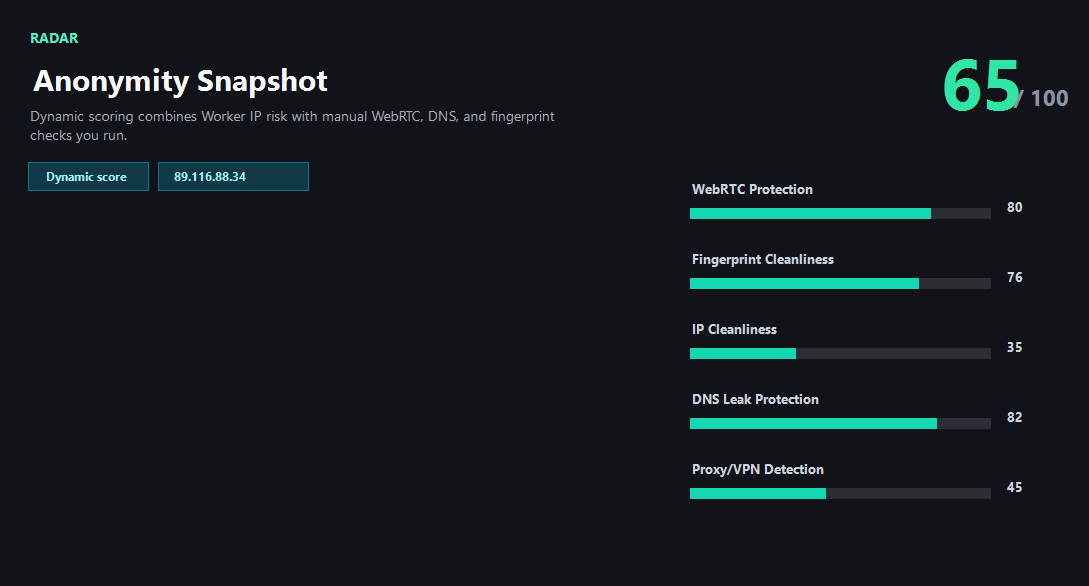
Example ping123 result screenshot
The screenshot below uses the designated sample IP 89.116.88.34, not a current visitor IP. Use it as a visual reference for the fields explained on this page.
Why external probes are required
A browser and Cloudflare Worker cannot provide a true ICMP ping or traceroute from several global locations. ping123 therefore treats probes as an external-node capability and keeps the Worker responsible for validation, signing, aggregation, and display.
If no probe nodes are configured yet, the page returns a clear unavailable state instead of pretending to run a real trace.
What the result fields mean
Normal signals vs. risk signals
How the composite risk score is calculated
Multiply the AbuseIPDB abuse score by 0.72 and take the greater of that value and the network baseline: Tor 72, VPN/proxy 58, or datacenter 42. If several types match, use only the first in that order. Then add 1 point per report, capped at 18 points. Round and limit the result to 0–100. Browser observations and latency do not contribute.
0–29 is low, 30–59 medium, 60–79 high and 80–100 critical. The composite score represents signals under the current rules, not a probability of malicious activity.
Port exposure and route measurements are separate security and connectivity observations. They do not change the composite IP score and do not guarantee platform access.
Usually normal
- Important regions return stable latency.
- No target region is unexpectedly unreachable.
- Route signals match the expected hosting geography.
- Probe node errors are isolated to one location.
Needs attention
- A key market shows timeout or high packet loss.
- Route hints point to an unexpected country or transit path.
- All nodes are unavailable because probe endpoints are not configured.
- The probe is unavailable.
Next action
Use probes after the IP looks clean
Port exposure and route measurements are separate security and connectivity observations. They do not change the composite IP score and do not guarantee platform access.
Fixes and next steps
- Retry later if no node is available.
- Retest from regions that match your users or accounts.
- Compare latency before choosing a proxy or server region.
- Treat missing nodes as an infrastructure issue, not a target verdict.
FAQ
Can Cloudflare Worker run traceroute directly?
No. The planned design uses external nodes for real network probing.
What happens before nodes are configured?
The API returns a clear unavailable warning.
Where do checks run?
External nodes perform these checks.
Before you continue
Read IP risk and route measurements separately
Port exposure and route measurements are separate security and connectivity observations. They do not change the composite IP score and do not guarantee platform access.