Browser consistency
Browser fingerprint check
A browser fingerprint check reviews the local signals that can make a session recognizable: user agent, timezone, language, screen size, Canvas, WebGL, fonts, hardware, and whether those signals match the current IP.
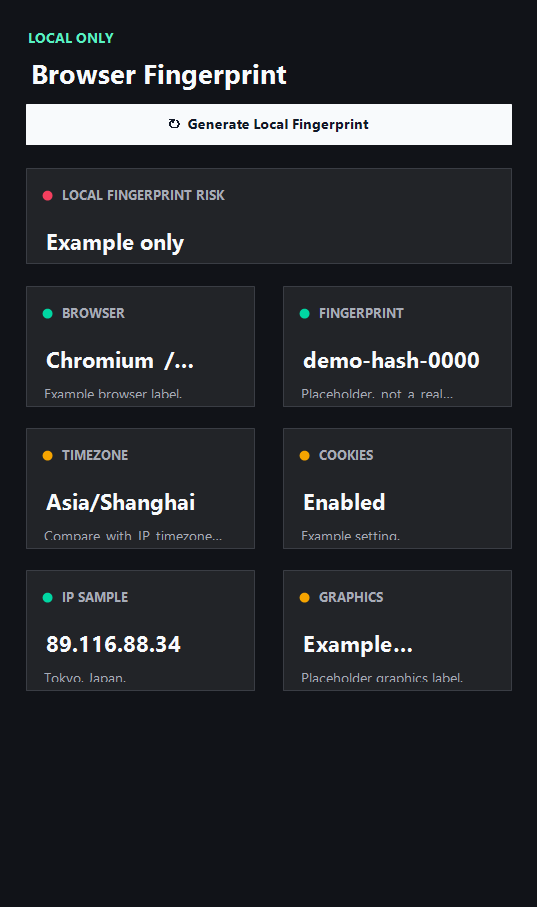
Example ping123 result screenshot
The screenshot below uses the designated sample IP 89.116.88.34, not a current visitor IP. Use it as a visual reference for the fields explained on this page.
Fingerprinting is about consistency and uniqueness
A browser fingerprint is a set of local signals that websites can use to recognize or score a session. Common signals include user agent, platform, timezone, language, screen size, color scheme, hardware concurrency, device memory, Canvas behavior, WebGL renderer, fonts, and extension side effects.
The question is not whether one signal is dangerous by itself. The question is whether the combination looks too unique or conflicts with the IP identity. A proxy in one country with a browser timezone, language, and graphics profile from another region can look unnatural before account login.
Why local fingerprint checks should be visible
Modern home, IP risk, privacy and latency pages start a shared session automatically, including external DNS and STUN connections. Direct entry to tools, method or policy pages does not start a session; an existing session may continue. Old language homepages show an IP profile and use separate buttons for extra browser checks. Guides are explanations, not test results.
A clean fingerprint workflow does not mean making every value random. Randomness can be suspicious when it changes too often. For many workflows, consistency is safer: stable browser profile, matching timezone and language, no unnecessary extensions, and an IP region that supports the same story.
How fingerprint and IP risk connect
IP reputation and fingerprint consistency are often evaluated together. A low-risk residential IP with a strange browser profile can still look risky. A datacenter VPN with a well-aligned browser may still be blocked because of IP type. You need both sides of the picture.
Use fingerprint checks before sensitive browsing, ad management, social account activity, or developer dashboard access. If the result looks inconsistent, fix the browser environment before blaming the proxy or VPN alone.
How ping123 reviews Browser fingerprint check results
This page is maintained as an editorial companion to the live ping123 tool. It explains which signals are collected, what a normal result usually looks like, and which mismatches deserve a second check before a login, payment, account review, or VPN/proxy workflow.
The sample screenshot is a fixed reference image, not a current visitor result. Use it to understand field names and result layout, then run the live check in your own browser session because IP, DNS, WebRTC, timezone, and reputation signals can change after every network switch.
- Start with the visible public IP and ASN.
- Compare country, timezone, DNS, and WebRTC signals instead of trusting one score.
- Treat risk labels as troubleshooting evidence, not as a guarantee of anonymity or safety.
- Rerun the check after changing VPN, proxy, browser profile, DNS, or network.
What the result fields mean
Normal signals vs. risk signals
Usually normal
- Timezone, language, and IP country tell a consistent story.
- User agent matches the actual browser and profile you intend to use.
- Fingerprint stays stable across retests in the same profile.
- No unusual extension or spoofing behavior changes values every refresh.
Needs attention
- Browser timezone conflicts with the IP country before account login.
- Language and locale do not match the target region or account history.
- Canvas or WebGL values change unpredictably between sessions.
- A proxy profile uses one region while fingerprint signals point somewhere else.
Next action
Check fingerprint consistency before sensitive browsing
Continue with the live ping123 check before trusting this browser session.
Fixes and next steps
- Use a clean browser profile for important accounts.
- Set timezone and language to match the intended account region.
- Remove unnecessary extensions before sensitive browsing.
- Avoid aggressive randomization that changes every page load.
- Retest after changing browser, profile, VPN, or proxy settings.
- Pair fingerprint checks with IP risk and leak tests before login.
- Record the IP, ASN, country, DNS result, WebRTC result, browser timezone, and final decision when the check is part of an account or team workflow.
- Change only one setting at a time, then rerun the same ping123 page so the cause of a warning is easier to identify.
FAQ
What is a browser fingerprint?
It is a combination of browser and device signals that can help websites recognize or score a session.
Can I completely hide my fingerprint?
Not reliably. The practical goal is to reduce unnecessary uniqueness and keep signals consistent with the session.
Does ping123 upload raw fingerprint components?
The fingerprint check is designed as a local diagnostic. It displays browser-side signals rather than silently uploading raw components.
Why does timezone matter?
Timezone is a strong context clue. If it conflicts with IP country or account history, the session can look suspicious.
Should I randomize every fingerprint value?
Usually no. Constant random changes can look less natural than a stable, coherent browser profile.
How does ping123 keep this page useful for review and real users?
We keep the page tied to a working tool, show example result screenshots, explain limits, and avoid saying that one score proves identity, anonymity, or account safety.
Does advertising affect this result?
Commercial relationships have not been confirmed. Promotional offers are not presented here.
Before you continue
Run the check before you continue
Use the live ping123 result as the source of truth for this browser session, then compare DNS, WebRTC, timezone, and IP reputation before deciding what to do next.