Risk and account safety
IP address risk score checker
An IP risk check helps decide whether an address is safe enough for registration, login, payment, advertising, API use, or account management. It combines reputation, proxy clues, ASN, location, and session consistency.
Contact channel is not open yet.
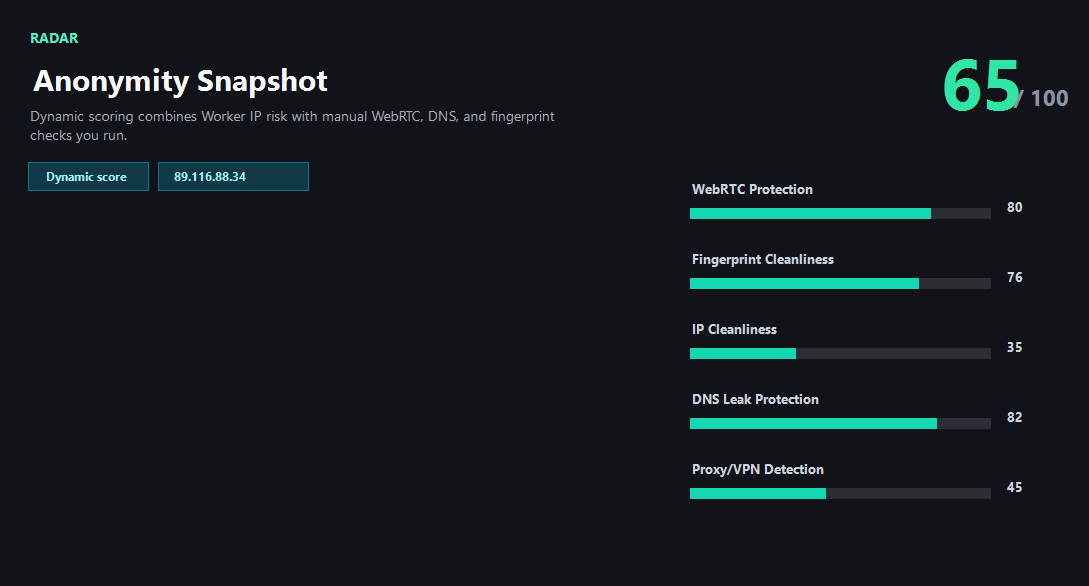
Example ping123 result screenshot
The screenshot below uses the designated sample IP 89.116.88.34, not a current visitor IP. Use it as a visual reference for the fields explained on this page.
What risk score means
An IP risk score is a practical warning level, not a final judgment about a person. It estimates whether an IP looks like a VPN, proxy, Tor exit, datacenter range, shared gateway, abused network, or unusual login context. A low score usually means fewer obvious warning signals. A high score means the address deserves caution before account activity.
Risk systems rarely use one field. They compare IP type, ASN, organization, country, historical abuse, proxy labels, account history, device consistency, browser fingerprint, timezone, and behavior. ping123 focuses on the browser-visible and server-visible signals that can be checked transparently.
When IP risk matters most
For simple reading or testing, a medium-risk IP may be fine. For signup, payment, ad accounts, cross-border commerce, social media operations, developer dashboards, or marketplace accounts, the same IP can create friction. Login systems may see a sudden country change, proxy ASN, or previously reported IP and trigger review.
The goal is not to find a perfect IP. The goal is to avoid obvious conflicts before they become account problems. If the IP country does not match the account region, the ASN looks like hosting, reputation is poor, and browser timezone conflicts, switch environments before logging in.
Business and API workflows
Teams that manage many accounts or regions need repeatable pre-login checks. A manual page is useful for operators, but an API workflow can enforce the same checks before every login, signup, ad launch, or payment flow. That includes IP risk, proxy type, DNS/WebRTC leak status, and browser consistency.
Modern home, IP risk, privacy and latency pages start a shared session automatically, including external DNS and STUN connections. Direct entry to tools, method or policy pages does not start a session; an existing session may continue. Old language homepages show an IP profile and use separate buttons for extra browser checks. Guides are explanations, not test results.
How ping123 reviews IP address risk score checker results
This page is maintained as an editorial companion to the live ping123 tool. It explains which signals are collected, what a normal result usually looks like, and which mismatches deserve a second check before a login, payment, account review, or VPN/proxy workflow.
The sample screenshot is a fixed reference image, not a current visitor result. Use it to understand field names and result layout, then run the live check in your own browser session because IP, DNS, WebRTC, timezone, and reputation signals can change after every network switch.
- Start with the visible public IP and ASN.
- Compare country, timezone, DNS, and WebRTC signals instead of trusting one score.
- Treat risk labels as troubleshooting evidence, not as a guarantee of anonymity or safety.
- Rerun the check after changing VPN, proxy, browser profile, DNS, or network.
What the result fields mean
Normal signals vs. risk signals
Usually normal
- Low risk score and no recent abuse indicators.
- ASN and organization match the intended network type.
- Country, timezone, DNS, and browser language are consistent.
- The IP has not suddenly changed away from the account's expected region.
Needs attention
- High risk score, proxy label, Tor label, or datacenter ASN before sensitive activity.
- Abuse reports or spam reputation attached to the address.
- Country mismatch between IP, DNS, timezone, and account history.
- Shared VPN or proxy exit reused across many unrelated accounts.
Next action
Check IP risk before login
Continue with the live ping123 check before trusting this browser session.
Contact channel is not open yet.
Fixes and next steps
- Switch to a cleaner VPN, proxy, mobile, or residential IP when risk is high.
- Avoid account login when IP country and account region conflict.
- Run DNS and WebRTC leak checks before trusting a proxy or VPN identity.
- Use a clean browser profile with consistent timezone, language, and fingerprint.
- Separate high-value accounts from shared or abused IP pools.
- For teams, build a pre-login risk workflow instead of checking manually after problems happen.
- Record the IP, ASN, country, DNS result, WebRTC result, browser timezone, and final decision when the check is part of an account or team workflow.
- Change only one setting at a time, then rerun the same ping123 page so the cause of a warning is easier to identify.
FAQ
What is IP risk?
It is a practical estimate of whether an IP may trigger trust, abuse, proxy, VPN, datacenter, or login review signals.
Is a high risk score proof of fraud?
No. It is a warning signal. Legitimate VPNs, hosting providers, and shared networks can look risky.
Should I check IP risk before signup?
Yes for accounts that matter. Signup systems often weigh IP reputation, region, device, and behavior together.
Can a clean IP still fail login?
Yes. Cookies, device history, browser fingerprint, account history, and behavior can still trigger review.
Do you support bulk IP risk checks?
The site is manual today, but the contact route is ready for API cooperation and bulk workflow discussions.
How does ping123 keep this page useful for review and real users?
We keep the page tied to a working tool, show example result screenshots, explain limits, and avoid saying that one score proves identity, anonymity, or account safety.
Does advertising affect this result?
Commercial relationships have not been confirmed. Promotional offers are not presented here.
Before you continue
Run the check before you continue
Use the live ping123 result as the source of truth for this browser session, then compare DNS, WebRTC, timezone, and IP reputation before deciding what to do next.
Contact channel is not open yet.