Pre-login safety check
Check IP before login
Before logging into important accounts, confirm that your IP region, reputation, proxy type, DNS, WebRTC, timezone, language, and browser fingerprint are consistent with the account context.
Contact channel is not open yet.
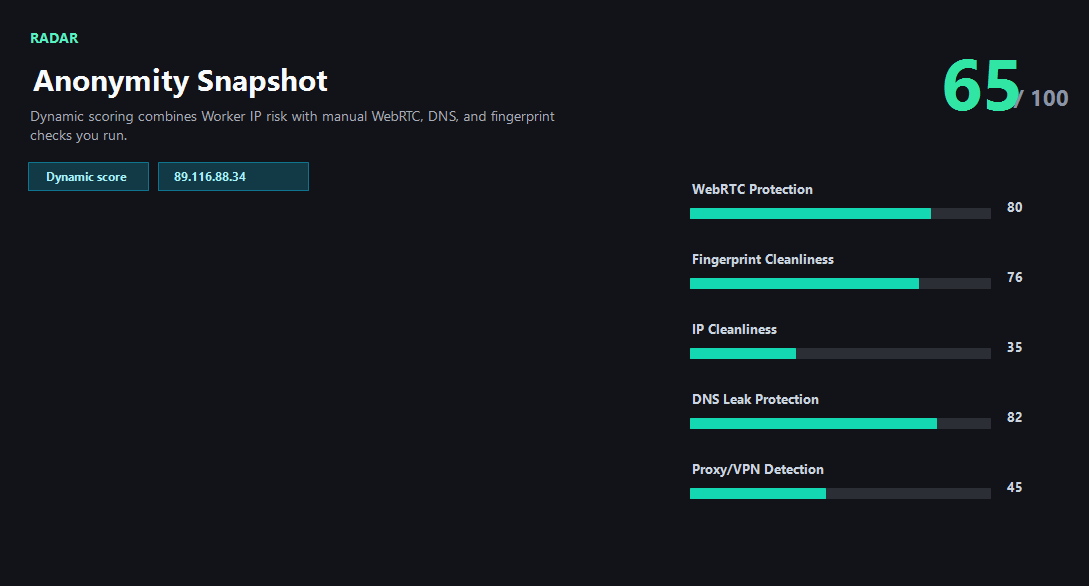
Example ping123 result screenshot
The screenshot below uses the designated sample IP 89.116.88.34, not a current visitor IP. Use it as a visual reference for the fields explained on this page.
Why login risk starts before the password
Many account systems evaluate the session before or during login. They may compare the current IP country with the account's normal region, check whether the IP belongs to a proxy or datacenter, review reputation history, inspect device and browser consistency, and look for DNS or WebRTC leaks that conflict with the visible IP.
This is why a pre-login IP check is useful for cross-border sellers, ad operators, social media teams, developers, affiliate teams, and anyone managing accounts across regions. It is not about bypassing rules. It is about avoiding obvious mismatches before you create unnecessary reviews.
The pre-login checklist
Start with the public IP. Confirm country, city, ASN, ISP, and network type. Then check reputation and risk score. If you are using a proxy or VPN, verify that DNS and WebRTC do not point to the original network. Finally, check browser timezone, language, user agent, and fingerprint signals for consistency.
If any major signal conflicts with the account region or previous account history, stop. Change one thing at a time: IP exit, VPN node, DNS settings, browser profile, or timezone. Rerun the same checklist after each change so you can identify the fix.
Strong commercial workflows need repeatability
For a single personal login, a manual checklist is enough. For teams managing ad accounts, stores, social profiles, marketplaces, or developer dashboards, the process should be repeatable. Operators need a standard pre-login workflow that flags risky IPs before people touch valuable accounts.
ping123 can help define that workflow: public IP, IP risk, proxy type, reputation, DNS leak, WebRTC leak, browser fingerprint, and account-region consistency. If your team needs bulk checks or API cooperation, the contact route is ready for a deeper conversation.
What the result fields mean
Normal signals vs. risk signals
Usually normal
- IP country and account region are consistent for the intended login.
- Risk score is low and the IP does not show obvious abuse history.
- DNS and WebRTC match the same network story as the public IP.
- Browser timezone, language, and profile match the account workflow.
Needs attention
- IP country suddenly differs from the account's normal region.
- The IP is a high-risk proxy, VPN, Tor, or datacenter exit.
- DNS or WebRTC reveals the original region while the public IP shows another country.
- Browser fingerprint looks inconsistent with the account or network context.
Next action
Run a login safety check
Continue with the live ping123 check before trusting this browser session.
Contact channel is not open yet.
Fixes and next steps
- Do not log in when region, reputation, and browser signals conflict.
- Switch to a cleaner IP that matches the account region.
- Use a dedicated browser profile for each important account context.
- Fix DNS and WebRTC leaks before opening the login page.
- Align timezone and language with the account's normal operating region.
- For teams, create a pre-login checklist or API workflow instead of relying on memory.
FAQ
Why should I check IP before login?
Because login systems can evaluate IP region, reputation, proxy type, browser fingerprint, and leak signals before trusting a session.
What is the biggest login risk signal?
There is no single signal. The most dangerous pattern is a cluster of mismatches: risky IP, wrong country, DNS leak, WebRTC leak, and inconsistent browser profile.
Should e-commerce and ad teams use this?
Yes. Stores, ad accounts, social accounts, and marketplaces often react strongly to unusual IP and device changes.
Can a clean IP guarantee login success?
No. Cookies, account history, device history, behavior, and platform rules also matter.
Can ping123 support a pre-login workflow?
The site provides manual checks today, and the business contact path is available for API cooperation or workflow discussions.
Before you continue
Run the check before you continue
A quick check now is easier than troubleshooting a login warning, proxy mismatch, or privacy leak later.
Contact channel is not open yet.