An IP leak is a mismatch between expected and visible routes
When a VPN, proxy, remote browser, or split-tunnel setup is active, the public IP should match the route you intended to use. An IP leak test checks whether another path is still visible through the browser, DNS, WebRTC, IPv6, or account context.
The important question is not whether one field says safe. The important question is whether the current browser session tells one consistent network story before you continue.
Example ping123 result to compare
Use the public IP result first, then add manual leak checks only when the session needs them.
The screenshot below is a fixed reference image. It is included so the guide has a concrete result layout, but the decision should always come from the live check in your own browser session.
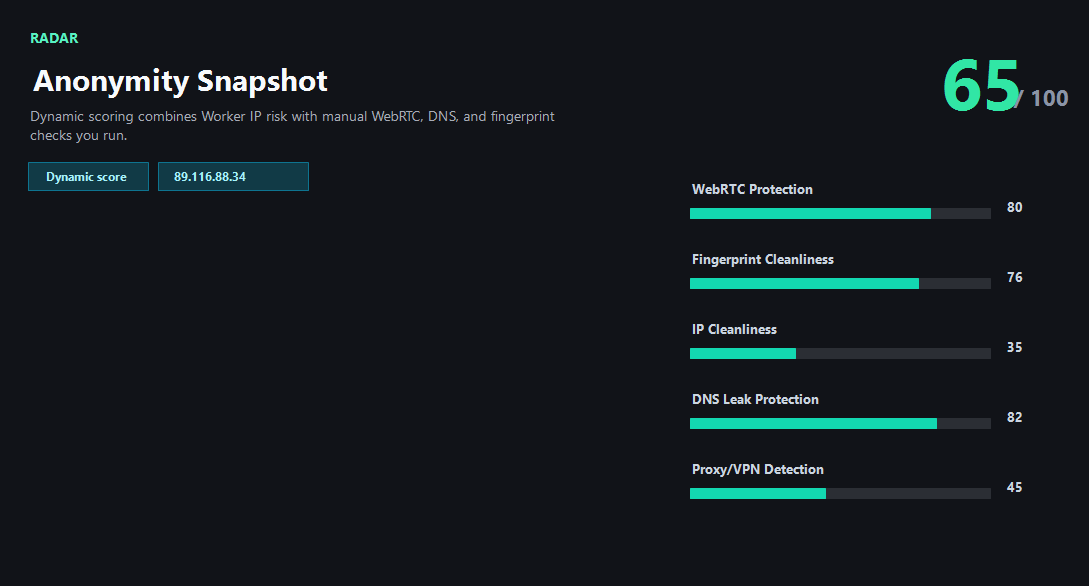
Treat the visible fields as evidence. A mismatch is a reason to investigate, not a final judgment about the person using the connection.
Normal vs warning signals
Use the table as a reading checklist. The goal is consistency across several visible signals, not perfection in one label.
| Signal | Usually acceptable | Needs a closer look |
|---|---|---|
| Public IP | Shows the expected VPN, proxy, or network exit. | Shows the original ISP, unexpected country, or mixed IPv4/IPv6 route. |
| WebRTC | Only mDNS, relay, or expected candidates appear. | A real public or local route conflicts with the visible IP. |
| DNS | Resolver path matches the intended route or a chosen secure DNS provider. | Resolver still belongs to the original ISP or another country. |
Leak-test workflow before trusting the route
A repeatable order makes the result easier to trust and easier to debug later. It also helps teams compare sessions without relying on memory.
- Check the public IP first.
- Run WebRTC manually and compare candidates.
- Run DNS manually and compare resolver country/provider.
- Check browser timezone and language for context.
- Change one setting at a time and retest.
Limits and next checks
ping123 is an informational diagnostic tool. It helps explain the current browser session, but it does not promise anonymity, identity verification, fraud status, account approval, or platform compliance.
- ping123 cannot see every app on the device.
- Some browsers mask local WebRTC candidates with mDNS.
- A VPN app may protect web traffic but not every system resolver path.
Related links
Related checks on ping123
Use these internal pages to continue the same privacy review with live tools and supporting guides.
FAQ
Is this result a guarantee that the session is safe?
No. It is a diagnostic check of visible network and browser signals. Account history, platform rules, payment details, behavior, and device trust can still matter.
Why does ping123 use a fixed sample screenshot in the guide?
The screenshot explains the fields without exposing a current visitor IP. Your live result should be checked in the browser session you actually plan to use.
What should I do when one signal looks wrong?
Change one setting at a time, rerun the same ping123 check, and compare the new result with the previous one so the cause is easier to isolate.
Do ads or partner links change the test?
No. Monetization does not alter the IP result, DNS result, WebRTC result, risk labels, screenshots, or editorial recommendations.
When should I rerun this check?
Rerun it after changing VPN server, proxy, DNS, browser profile, network, mobile hotspot, or before an account-sensitive login.