Blacklist and abuse context
IP blacklist check
An IP blacklist check helps you understand whether the current address may be distrusted because of spam, abuse reports, blocklist context, proxy or VPN labels, Tor signals, hosting ASN, or shared use. Use it before account login, signup, email, payment, ads, or proxy QA.
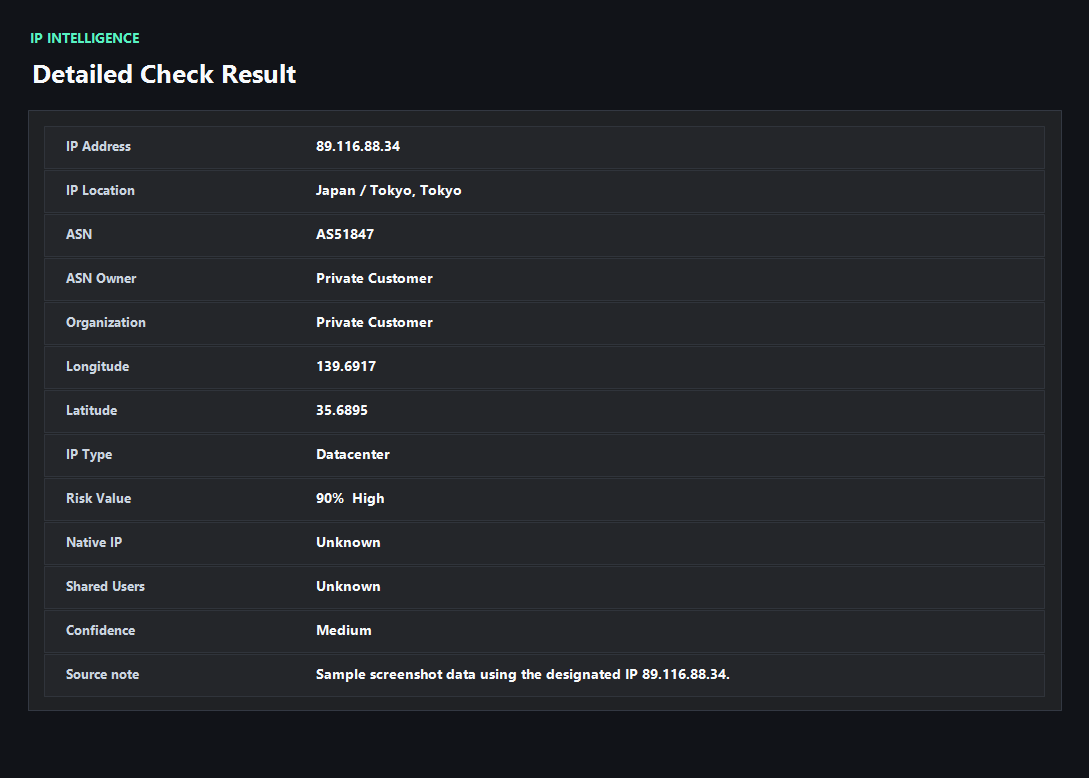
Example ping123 result screenshot
The screenshot below uses the designated sample IP 89.116.88.34, not a current visitor IP. Use it as a visual reference for the fields explained on this page.
A blacklist hit needs context
A blacklist result is not a universal yes or no answer. Email, login, payment, ad accounts, proxy QA, and casual browsing each react differently to blocklist and abuse data.
A recent spam listing can matter a lot for email. A hosting ASN can matter more for consumer account signup. A DNS or WebRTC mismatch can make a clean IP look suspicious even when blacklist context is weak.
What to check besides blacklist status
Look at the IP owner, ASN type, proxy/VPN/Tor labels, abuse reports, shared-use clues, country, DNS resolver, WebRTC candidates, timezone, language, and account region. The strongest warning usually comes from a cluster of signals, not one field.
ping123 frames blacklist checks as a decision step: continue, rotate IP, change provider, fix DNS/WebRTC, align browser context, or avoid using the IP for sensitive workflows.
Use blacklist checks before problems happen
Many teams only check blacklists after mail fails, a signup is blocked, or an account gets challenged. A preflight check is easier: test the IP before sending mail, opening admin panels, buying proxies, running ads, or logging into valuable accounts.
For repeatable work, log the IP, ASN, provider, blacklist context, risk score, DNS result, WebRTC result, and the time of the test.
What the result fields mean
Normal signals vs. risk signals
Usually normal
- No recent or meaningful blacklist context for the workflow.
- ASN, location, and network type match the provider claim.
- No strong proxy, VPN, Tor, spam, or abuse labels appear.
- DNS, WebRTC, timezone, and language are consistent with the visible IP.
Needs attention
- Recent spam, abuse, attack, or malware context appears for the IP.
- The IP is a shared proxy, VPN, Tor exit, or datacenter range before sensitive account activity.
- Different tools disagree, but multiple sources point to the same risk category.
- Blacklist context appears together with DNS, WebRTC, or browser-region mismatch.
Next action
Turn blacklist data into a clear next step
The useful question is not only whether the IP appears on a list. It is whether the listed reason matters for login, signup, email, ads, payment, or proxy QA.
Fixes and next steps
- Rotate IPs when recent abuse, spam, or serious blacklist context is the main trigger.
- Contact the provider when a paid static IP has polluted reputation or stale ownership data.
- Use a different network type when datacenter or proxy labels are the problem.
- Fix DNS and WebRTC leaks before retesting a clean-looking IP.
- Avoid reusing one shared exit across unrelated accounts or high-value workflows.
- Keep a blacklist and reputation check in pre-login, pre-send, and proxy QA routines.
FAQ
What is an IP blacklist check?
It is a check for spam, abuse, security, proxy, or reputation context that may cause systems to distrust an IP address.
Does one blacklist result mean the IP is unusable?
No. It depends on the list, category, recency, and workflow. Email and payment systems are usually more sensitive than casual browsing.
Is blacklist checking the same as IP reputation checking?
Blacklist data is one part of reputation. Reputation also includes ASN type, proxy labels, abuse reports, sharing, location, and session consistency.
Can a residential IP be blacklisted?
Yes. Residential IPs can inherit abuse reports from prior users, malware, shared proxy pools, or compromised devices.
What should I test after a blacklist check?
Run IP risk, proxy detection, DNS leak, WebRTC leak, and browser fingerprint checks before sensitive workflows.
Before you continue
Check blacklist context before the IP touches important systems
ping123 keeps the blacklist, reputation, proxy, leak, and browser clues together so the next action is easier to choose.