Proxy and anonymizer signals
Proxy detection test
A proxy detection test checks whether the current IP looks like a proxy, VPN, Tor exit, datacenter gateway, residential network, mobile carrier, or shared anonymizer. Use it before account login, signup, payment, ad review, or proxy quality testing.
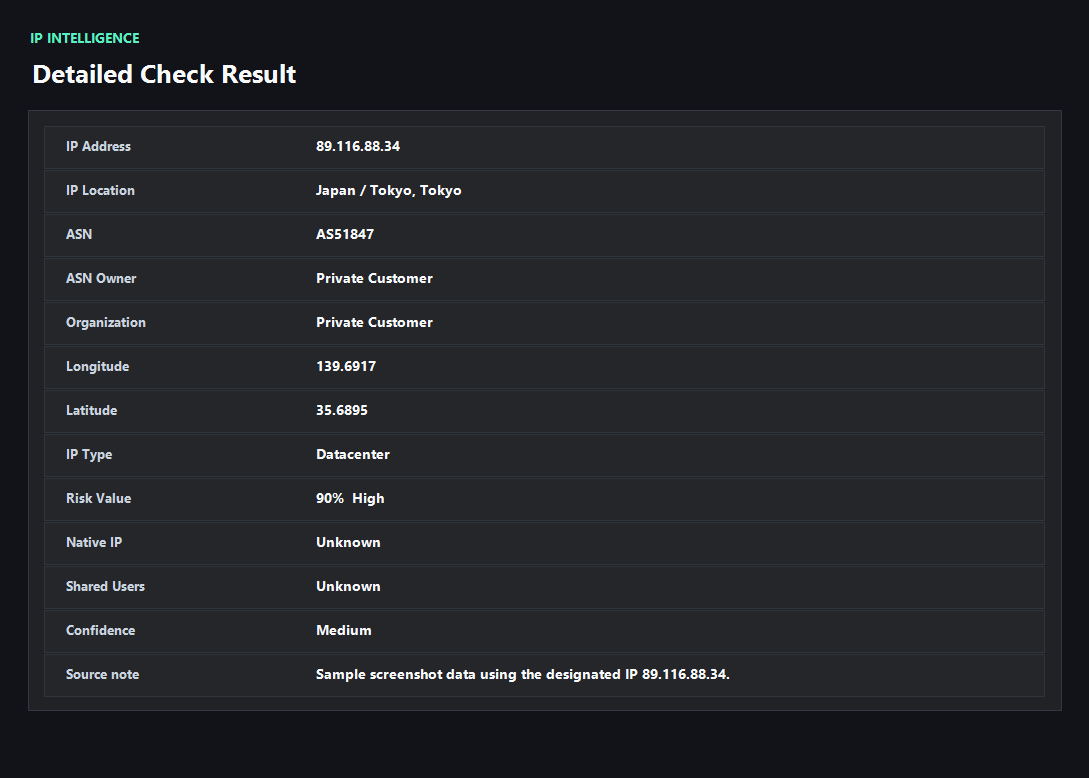
Example ping123 result screenshot
The screenshot below uses the designated sample IP 89.116.88.34, not a current visitor IP. Use it as a visual reference for the fields explained on this page.
Proxy detection is about evidence, not a single label
A useful proxy detection result does more than say proxy or not proxy. It should explain whether the signal came from ASN ownership, hosting infrastructure, VPN databases, Tor behavior, shared gateway patterns, abuse reports, DNS mismatch, WebRTC exposure, or browser context.
That explanation matters because the fix is different. A datacenter ASN may require a different IP source, while a WebRTC mismatch may be solved inside the browser profile.
When proxy detection matters
Proxy detection matters most before signup, login, payment, advertising, marketplace operations, scraping QA, fraud-prevention QA, and proxy purchasing. These workflows often compare IP type, reputation, account region, browser timezone, DNS, and device context together.
A proxy can be technically active and still be a bad fit for the job. A shared datacenter exit might be fine for API testing, but risky for consumer account workflows that expect residential or mobile traffic.
How to use the result
If the IP is detected as proxy-like and the workflow expects normal consumer traffic, switch to a better-suited exit before touching the account. If the proxy type is acceptable but DNS, WebRTC, timezone, or language conflicts with it, fix the session consistency first.
For teams, keep a simple proxy QA checklist: public IP, ASN, proxy/VPN/Tor label, blacklist context, DNS, WebRTC, timezone, language, and account region.
What the result fields mean
Normal signals vs. risk signals
Usually normal
- ASN and organization match the proxy type or network type you expected.
- No strong proxy, VPN, Tor, or abuse label appears for the current workflow.
- DNS and WebRTC do not expose another network path.
- Browser timezone and language fit the IP country and account context.
Needs attention
- Hosting or cloud ASN appears when the task expects residential or mobile traffic.
- Proxy, VPN, Tor, or shared gateway labels appear before account or payment activity.
- The IP has blacklist or abuse context from prior use.
- DNS, WebRTC, timezone, language, or account region conflicts with the proxy exit.
Next action
Find the proxy trigger before you rotate
Randomly changing exits can hide the real cause. Check whether the trigger is the IP source, blacklist history, DNS, WebRTC, or browser consistency.
Fixes and next steps
- Use residential or mobile traffic only when the workflow genuinely expects consumer network behavior.
- Avoid shared datacenter proxy exits for sensitive signup, payment, or account workflows.
- Switch proxy exits when ASN, country, or reputation does not match the provider claim.
- Fix DNS and WebRTC mismatches before blaming the proxy provider.
- Align timezone, language, and account region with the selected proxy location.
- Retest after changing proxy provider, exit city, VPN node, DNS settings, or browser profile.
FAQ
What is proxy detection?
It is the process of checking whether an IP or browser session looks like proxy, VPN, Tor, hosting, shared gateway, or other anonymized traffic.
Can websites detect all proxies?
No. Detection varies by data source, network behavior, browser signals, and reputation history. Most systems use probability signals.
Is a proxy label always bad?
No. It depends on the workflow. API testing may allow proxies, while payments, signups, ads, and account recovery can be more sensitive.
How is proxy detection different from proxy checking?
Proxy checking verifies whether the proxy works and matches expectations. Proxy detection focuses on whether a site may classify the visible session as proxy-like.
What should I test after proxy detection?
Run IP risk, IP blacklist, DNS, WebRTC, and browser fingerprint checks to confirm the whole session is consistent.
Before you continue
Check proxy-like signals before a sensitive workflow
ping123 helps you see the visible proxy, reputation, leak, and browser clues before a site or risk system reacts to them.